Signing up takes a few minutes. The first steps are the same for everyone. Then Ezyiah asks who you are, so it can set things up for you. Every new account starts with a 15-day free trial. You don’t need a credit card to start.

Start signing up

1

Open the sign-up page
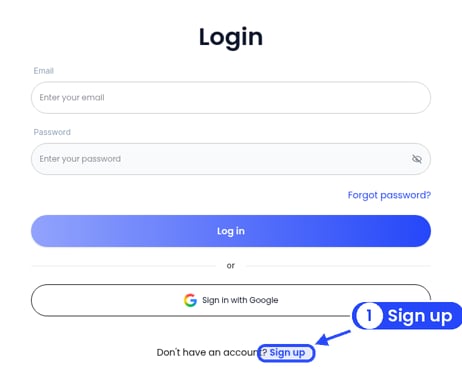
The Login page with a callout on the Sign up link

New to Ezyiah? Click Sign up on the Login page

Go to app.ezyiah.com.au/signup. Or, on the Login page, click Sign up next to “Don’t have an account?”.
2

Enter your email

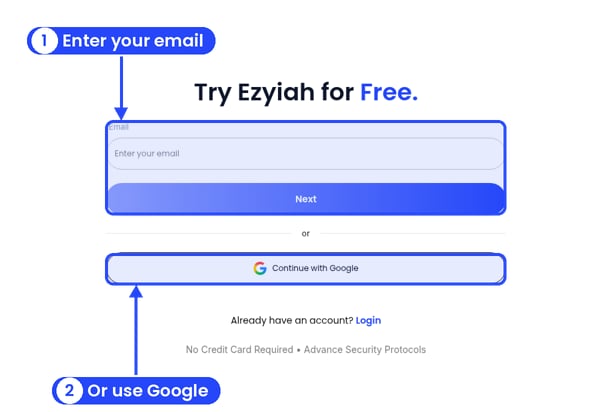
The Try Ezyiah for Free screen with callouts on the email field and Next, and on Continue with Google

Enter your email, or use Google

On Try Ezyiah for Free., type your email address and click Next.Prefer Google? Click Continue with Google instead.
3

Verify your email

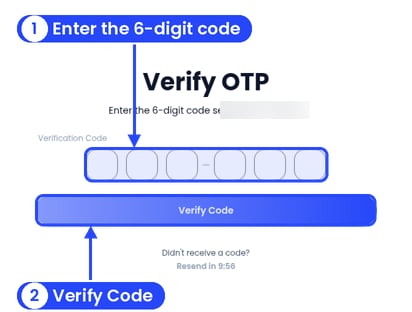
The Verify OTP screen with callouts on the six code boxes and the Verify Code button. The email address is blurred

Type the 6-digit code we email you

We email you a 6-digit code. The email’s subject is “Your verification code”, and the code works for 10 minutes. On the Verify OTP screen, type the code into the six boxes and click Verify Code.No email? Check your spam or junk folder. You can ask for a new code once the Resend timer runs out.
4

Tell us what describes you best

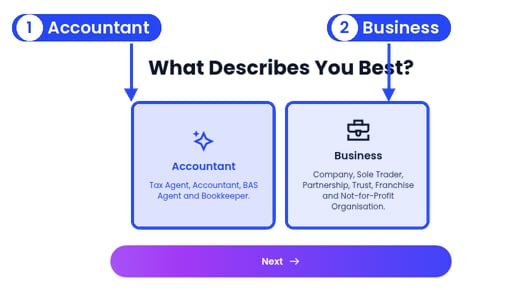
The What Describes You Best? screen with callouts on the Accountant card and the Business card

Pick the option that describes you

On What Describes You Best?, pick Accountant or Business, then click Next. The bar at the top shows your progress through Personal Info and Tax Info.

Which option should I pick?

Accountants get a 15-day trial with 1,000 transactions. Businesses get a 15-day trial with 250 transactions. Business owners add their business name, ABN, industry and business type after setting a password.

Next steps

Accountants and bookkeepers

Finish setting up your firm account.

Business owners

Finish setting up your business account.