

There’s no AI Memory screen. Ezyiah simply remembers how you move or categorise transactions, and uses that next time.
How it works
Ezyiah keeps two kinds of memory:- Firm memory. How your firm likes things done. It applies to every client.
- Client memory. How one client’s transactions should be coded. It applies to that client only.
Teach Ezyiah a coding choice
You do this when you move a transaction to a different account.1
Find the transaction
Open the client’s Chart of Accounts, then open the account the transaction is in.
2
Click Move
Tick the box next to the transaction. Click Move in the bar at the bottom of the screen.
3
Pick the right account
Click Select Account and pick the account. You can search by name or code.
4
Choose what Ezyiah remembers
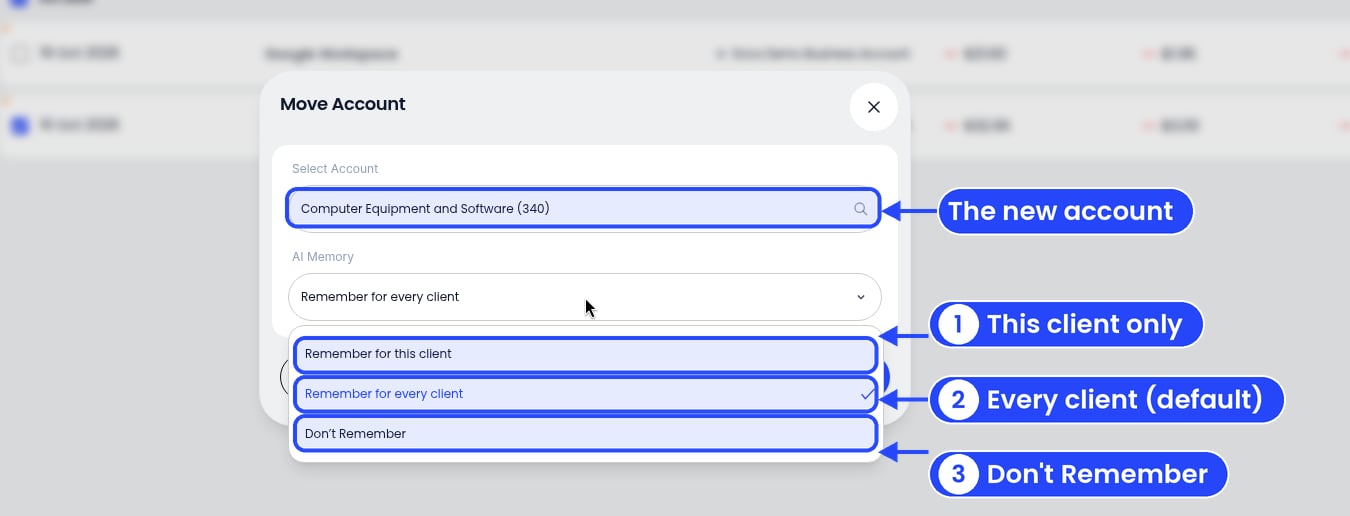
The three AI Memory options
- Remember for this client. Only this client’s matching transactions.
- Remember for every client. Matching transactions for all your clients. This is picked to start with.
- Don’t Remember. Just this one move. Nothing is saved.
5
Click Move
The transaction moves straight away. Changed your mind? Click Cancel.
AI Memory makes suggestions. You still check the coding and approve it before you lodge anything.