

Step by step
1
Open the client
Search for the client in the sidebar, or pick them from All Clients.
2
Go to Basic Info
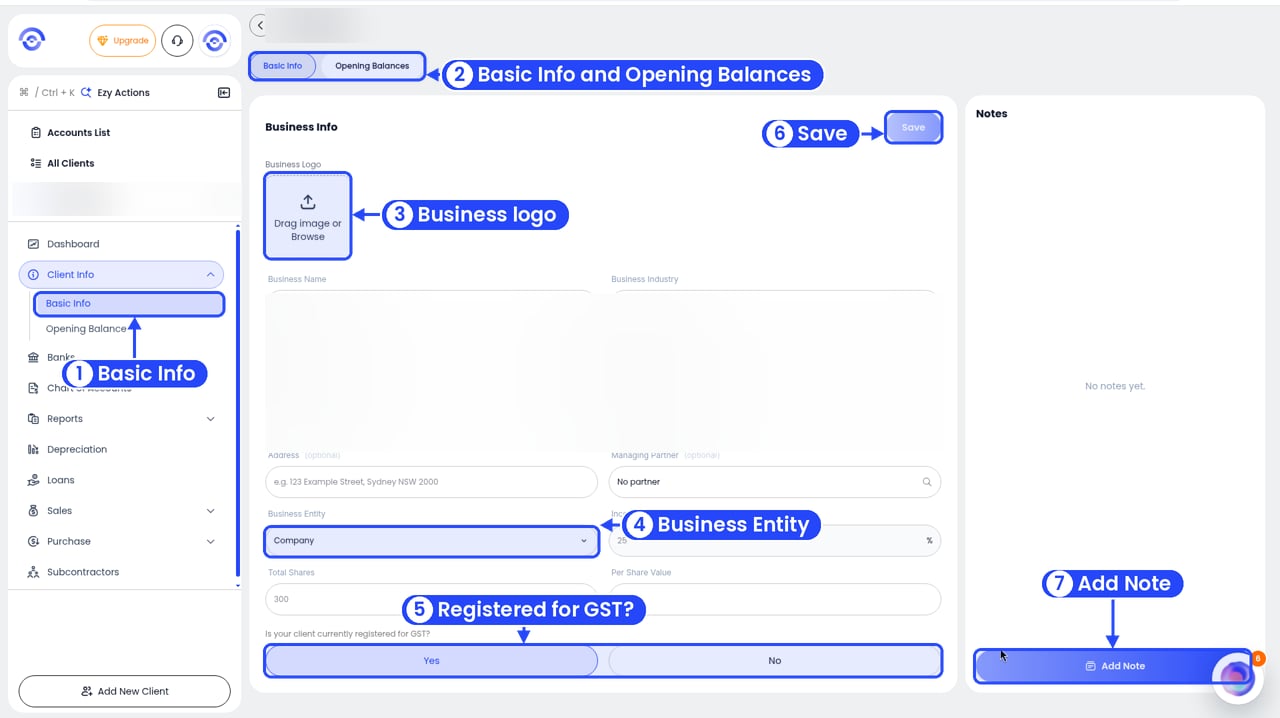
A client's Basic Info
3
Change what you need
You can change:
- Business Logo: drag in an image, or click to upload one.
- Business Name: the name on every report.
- Business Industry: helps Ezyiah code transactions.
- Legal Name (optional): if it’s different from the business name.
- ABN
- Email and Phone Number (both optional)
- Address (optional)
- Managing Partner (optional): the person in your firm who looks after them.
- Business Entity: Company, Partnership, Sole Trader, Unit Trust or Discretionary Trust.
- Income Tax Percentage, Total Shares and Per Share Value: for companies only.
- Is your client currently registered for GST?: Yes or No.
4
Save
Click Save in the top right. Your changes show straight away across the client’s file and reports.