Tell Ezyiah where your accounts stood when you started
Your business probably had money in the bank, customers who owed you, or a loan before you started using Ezyiah. Opening balances tell Ezyiah where each account stood on day one, so your reports start from the right place.Your accountant usually gives you these figures from your last balance sheet. They can also add them for you once you’ve invited them. Either way, your accountant reviews and approves them.
Find it
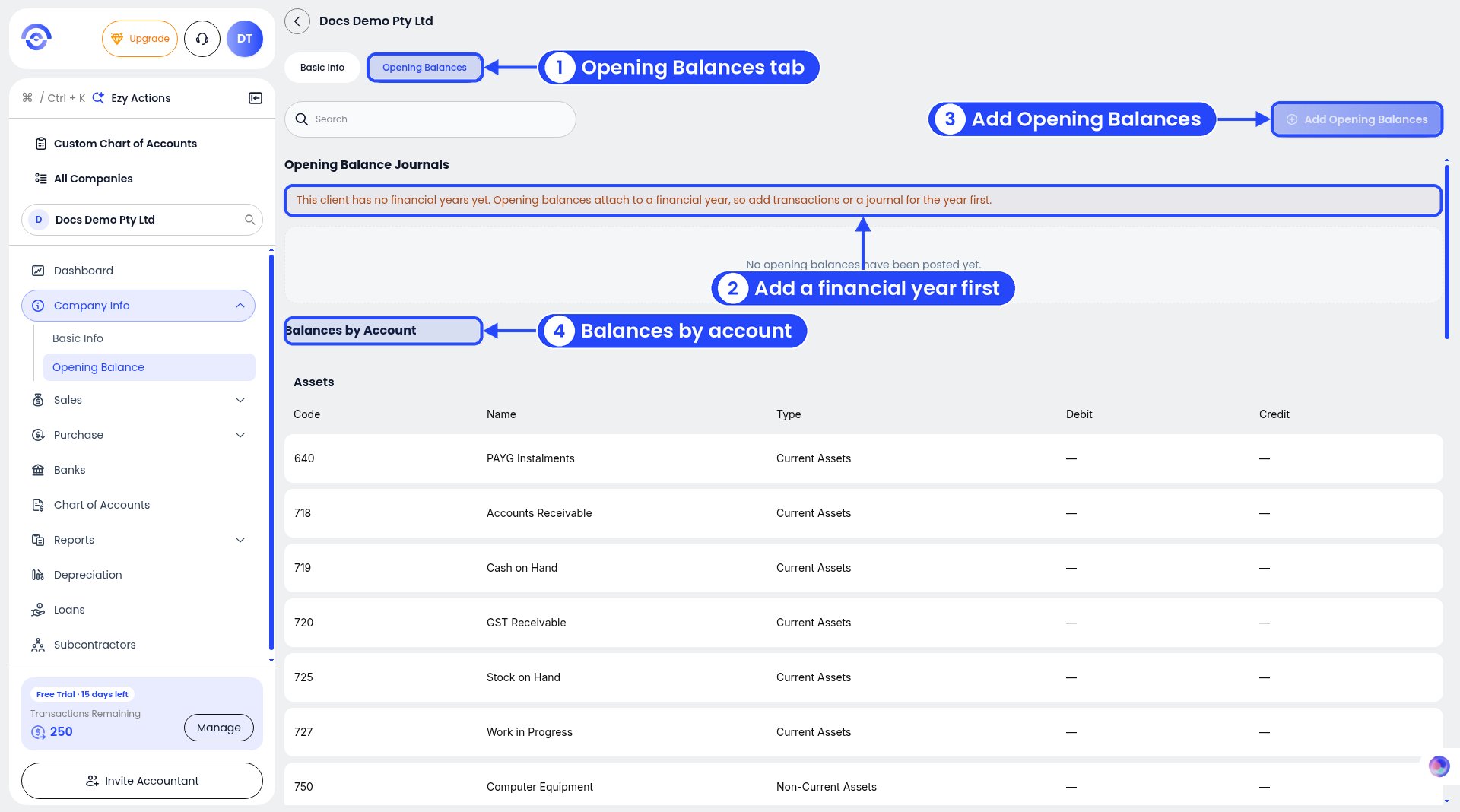
Opening Balances before your first financial year
Click Company Info in the sidebar, then Opening Balance. The Opening Balances tab opens (next to Basic Info). You’ll see:
Opening Balance Journals: opening balances already posted. Before you add any, it says “No opening balances have been posted yet.”
Balances by Account: every account with its Code, Name, Type, Debit and Credit, grouped under headings like Assets. For example, 718 Accounts Receivable and 719 Cash on Hand.
Is the button greyed out?
Add Opening Balances is greyed out until there is a financial year
On a new business you’ll see: “This client has no financial years yet. Opening balances attach to a financial year, so add transactions or a journal for the year first.”Add Opening Balances stays greyed out until there’s a financial year. Once there is one, the button works. To start one, connect your bank, upload a bank statement, or post a journal.
Add your opening balances
1
Click Add Opening Balances
Opening Balances once you have a financial year
It’s at the top right. Or press Ctrl + K (Cmd + K on a Mac) and pick Add Opening Balance in Ezy Actions.
2
Enter each balance
A balanced opening balance journal
Pick the Financial Year and add a Reference if you like. Opening balances are dated 1 July of the year you pick. Click + Opening Balance Line for each account, with a debit or a credit. Total Debits and Total Credits must match, so Out of balance shows $0.00. Then click Post Opening Balances.
3
Post and check
Check Balances by Account after posting. Each account you used shows its amount.
Example
On 1 July 2025, Docs Demo Pty Ltd had $8,000 in the bank, and customers owed it $3,200.
Account
Debit
Credit
701 Cash at Bank
$8,000.00
718 Accounts Receivable
$3,200.00
Retained Earnings (equity)
$11,200.00
The last line balances the journal in equity. Docs Demo Pty Ltd is a company, so it uses retained earnings. A sole trader would use owner’s capital, and a partnership partner capital. Your accountant can tell you which account to use. See Choosing the business entity.
Not sure of the figures? Leave this to your accountant. A wrong opening balance flows into every report.
For the full window, step by step, see Opening balances. That page is written for accountants. Its Chart of Accounts button isn’t on business accounts.Example: Docs Demo Pty Ltd starts 2026-2027 with $1,000 in its bank account. The journal has two lines: **701 Bank: Docs Demo Bank - Cash at bank**, debit $1,000, and 910 Retained Earnings - Opening, credit $1,000. **Out of balance** is **$0.00**, so it can be posted.After you post, the journal shows under Opening Balance Journals with its Reference, Financial Year, Total Debits, Total Credits and number of Lines. Click the arrow at the end of the row to see the lines.
See it on your bank account
Your opening balance at the bottom of a bank account's page
Click Banks in the sidebar, then click the bank account. The bar at the bottom shows:
Opening Balance: what the account started with. Click the pencil next to it to edit your opening balance.
Net Movement: money in minus money out.
Closing Balance: where the account ends up.
Example: Docs Demo Bank starts with an Opening Balance of $1,000.00. Its transactions add up to a **Net Movement** of $7,832.90, so the Closing Balance is $8,832.90.
Business accounts don’t have an Opening Balances button on Chart of Accounts. Use Company Info > Opening Balance, or the pencil on your bank account’s page.
Change or delete opening balances
1
Tick the journal
Tick a journal to edit or delete it
Tick the box at the start of its row under Opening Balance Journals. A bar appears at the bottom.
2
Click Edit or Delete
Edit opens the Edit Opening Balances window. It works like adding: change the lines, then click Post Opening Balances.
3
Confirm a delete
Deleting can't be undone
Delete asks “Delete opening balances?”. It says, for example, “This permanently deletes 2 opening balance lines posted as Docs test opening balance. This can’t be undone.” Click Delete to confirm, or Cancel.
Deleting opening balances changes every report from that year on. Check with your accountant first.
Post a journal
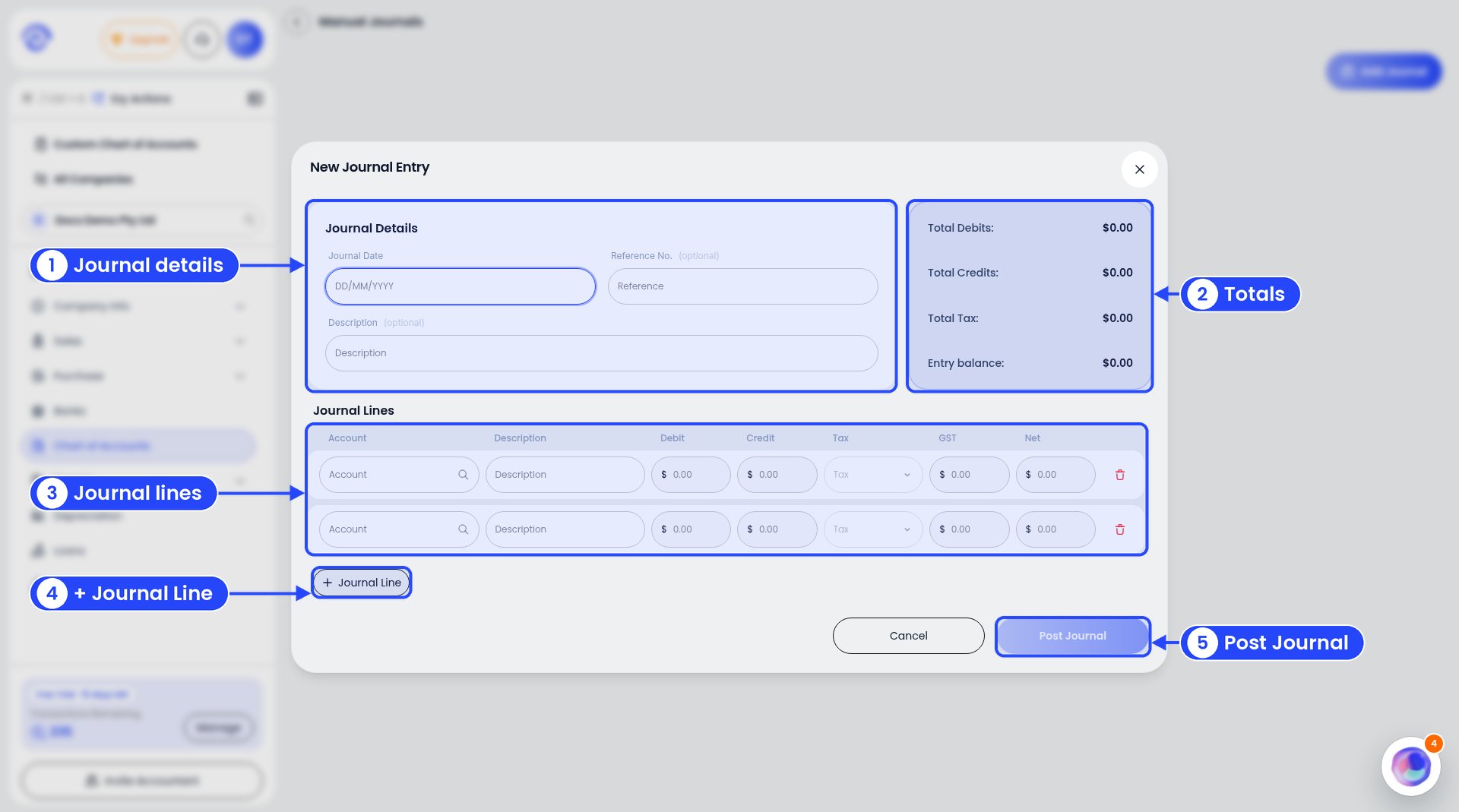
The New Journal Entry window
Press Ctrl + K (Cmd + K on a Mac) to open Ezy Actions, then pick Add Journal. The New Journal Entry window opens.
1
Add the journal details
Enter the Journal Date. Reference No. and Description are optional.
2
Fill in the lines
For each line, pick the Account, add a Description, and enter a Debit or a Credit. Pick Tax once you’ve chosen the account. GST and Net are worked out for you. Click + Journal Line for more lines.
3
Check the totals
The box on the right shows Total Debits, Total Credits, Total Tax and Entry balance. Debits and credits must match.
4
Click Post Journal
Post Journal lights up once the journal is ready. Changed your mind? Click Cancel.
{"docsConfig":{"theme":"mint","$schema":"https://mintlify.com/docs.json","name":"Ezyiah","description":"Help docs for Ezyiah, AI accounting software built for the Australian market","colors":{"primary":"#2547F9","light":"#9298F9","dark":"#2547F9"},"logo":{"light":"https://mintcdn.com/ezyiah-3f16b61b/Ve47CujuGgN4pyqd/images/light.svg?fit=max\u0026auto=format\u0026n=Ve47CujuGgN4pyqd\u0026q=85\u0026s=a93f09364beedb00d71c1ee4b10f4954","dark":"https://mintcdn.com/ezyiah-3f16b61b/Ve47CujuGgN4pyqd/images/dark.svg?fit=max\u0026auto=format\u0026n=Ve47CujuGgN4pyqd\u0026q=85\u0026s=683424342d364154020a02a73e811824","href":"https://ezyiah.com.au"},"favicon":"https://mintcdn.com/ezyiah-3f16b61b/Ve47CujuGgN4pyqd/images/favicon.svg?fit=max\u0026auto=format\u0026n=Ve47CujuGgN4pyqd\u0026q=85\u0026s=11a9119ebc819180d54cd3d82ce71478","appearance":{"default":"light"},"background":{"color":{"light":"#F8F7F7","dark":"#000000"}},"navbar":{"links":[{"href":"https://ezyiah.com.au","label":"Main site"},{"href":"https://app.ezyiah.com.au/login","label":"Sign in"}],"primary":{"type":"button","label":"Get Started for Free","href":"https://app.ezyiah.com.au/signup"}},"footer":{"socials":{"linkedin":"https://www.linkedin.com/company/ezyiah","instagram":"https://www.instagram.com/ezyiah.com.au","youtube":"https://www.youtube.com/@EzyiahAI"}},"fonts":{"family":"Poppins"},"contextual":{"options":["copy","view","chatgpt","claude","perplexity","mcp","cursor","vscode"],"display":"header"},"styling":{"latex":true},"navigation":{"pages":[]}},"deployment":{"deploymentMetadataValue":{"subdomain":"ezyiah-3f16b61b","hasAudioNarration":false,"actualSubdomain":"ezyiah-3f16b61b","customDomains":["help.ezyiah.com.au"],"gitSource":{"type":"github","owner":"mintlify-community","repo":"docs-ezyiah-3f16b61b-bba5fbb8","deployBranch":"main","contentDirectory":"","isPrivate":true,"mountPath":"","label":""},"entitlements":{"AI_CHAT":{"status":"DISABLED"}},"buildId":"6b01a01dbee042a6adbe5f0d","clientVersion":"0.0.4270","searchFilterCounts":[{"language":"default","tag":"Banks \u0026 Reports","count":28},{"language":"default","tag":"Businesses","count":17},{"language":"default","tag":"Accountants","count":14},{"language":"default","tag":"Get Started","count":12},{"language":"default","tag":"Reports","count":9},{"language":"default","tag":"Getting started","count":8},{"language":"default","tag":"Clients","count":6},{"language":"default","tag":"Banks","count":6},{"language":"default","tag":"Your business","count":5},{"language":"default","tag":"Settings","count":4}]},"assistantConfig":{"enableAskAiButton":false,"enableStarterQuestions":false,"enableContextualStarterQuestions":false,"enableAskAiSearchBar":true,"deflection":{"enabled":true,"email":"support@ezyiah.com.au"}},"basePath":"","hasChatPermissions":false,"hasWebMcpPermissions":false,"toggles":[{"name":"kill-isr","enabled":true,"variant":{"name":"disabled","enabled":false,"feature_enabled":true},"impressionData":false},{"name":"custom-rbac-roles","enabled":true,"variant":{"name":"disabled","enabled":false,"feature_enabled":true},"impressionData":false},{"name":"agent-mintlify-slack","enabled":true,"variant":{"name":"disabled","enabled":false,"feature_enabled":true},"impressionData":false},{"name":"agent-integrations-settings","enabled":true,"variant":{"name":"disabled","enabled":false,"feature_enabled":true},"impressionData":false},{"name":"rbac-expansion","enabled":true,"variant":{"name":"disabled","enabled":false,"feature_enabled":true},"impressionData":false},{"name":"automations-pr-grouping","enabled":true,"variant":{"name":"disabled","enabled":false,"feature_enabled":true},"impressionData":false},{"name":"custom-prefix","enabled":true,"variant":{"name":"disabled","enabled":false,"feature_enabled":true},"impressionData":false},{"name":"analytics-v7","enabled":true,"variant":{"name":"disabled","enabled":false,"feature_enabled":true},"impressionData":false},{"name":"user-flows-analytics","enabled":true,"variant":{"name":"disabled","enabled":false,"feature_enabled":true},"impressionData":false},{"name":"no-publish-flow","enabled":true,"variant":{"name":"disabled","enabled":false,"feature_enabled":true},"impressionData":false},{"name":"workos-onboarding","enabled":true,"variant":{"name":"disabled","enabled":false,"feature_enabled":true},"impressionData":false},{"name":"snapshot-serving-live","enabled":true,"variant":{"name":"disabled","enabled":false,"feature_enabled":true},"impressionData":false},{"name":"stripTemperatureMiddleware","enabled":true,"variant":{"name":"disabled","enabled":false,"feature_enabled":true},"impressionData":false},{"name":"support-platform-pylon-zendesk","enabled":true,"variant":{"name":"disabled","enabled":false,"feature_enabled":true},"impressionData":false},{"name":"snapshot-serving","enabled":true,"variant":{"name":"disabled","enabled":false,"feature_enabled":true},"impressionData":false},{"name":"instant-rollback","enabled":true,"variant":{"name":"disabled","enabled":false,"feature_enabled":true},"impressionData":false},{"name":"granular-notifications-server","enabled":true,"variant":{"name":"disabled","enabled":false,"feature_enabled":true},"impressionData":false},{"name":"granular-notifications","enabled":true,"variant":{"name":"disabled","enabled":false,"feature_enabled":true},"impressionData":false},{"name":"automations-fable","enabled":true,"variant":{"name":"disabled","enabled":false,"feature_enabled":true},"impressionData":false},{"name":"fixed-ai-action-pricing","enabled":true,"variant":{"name":"disabled","enabled":false,"feature_enabled":true},"impressionData":false},{"name":"site-roles","enabled":true,"variant":{"name":"disabled","enabled":false,"feature_enabled":true},"impressionData":false},{"name":"automation-resolve-merge-conflict","enabled":true,"variant":{"name":"disabled","enabled":false,"feature_enabled":true},"impressionData":false},{"name":"scoped-publishing","enabled":true,"variant":{"name":"disabled","enabled":false,"feature_enabled":true},"impressionData":false},{"name":"mintql","enabled":true,"variant":{"name":"disabled","enabled":false,"feature_enabled":true},"impressionData":false},{"name":"page-level-analytics","enabled":true,"variant":{"name":"disabled","enabled":false,"feature_enabled":true},"impressionData":false},{"name":"editor-version-history-v2","enabled":true,"variant":{"name":"disabled","enabled":false,"feature_enabled":true},"impressionData":false},{"name":"billing-page-v2","enabled":true,"variant":{"name":"disabled","enabled":false,"feature_enabled":true},"impressionData":false},{"name":"full-page-search","enabled":true,"variant":{"name":"disabled","enabled":false,"feature_enabled":true},"impressionData":false},{"name":"workspace-projects","enabled":true,"variant":{"name":"disabled","enabled":false,"feature_enabled":true},"impressionData":false},{"name":"assistant-v5","enabled":true,"variant":{"name":"disabled","enabled":false,"feature_enabled":true},"impressionData":false},{"name":"fork-pr-previews","enabled":true,"variant":{"name":"disabled","enabled":false,"feature_enabled":true},"impressionData":false},{"name":"revalidation-jwt","enabled":true,"variant":{"name":"disabled","enabled":false,"feature_enabled":true},"impressionData":false},{"name":"workos-sso-scim","enabled":true,"variant":{"name":"disabled","enabled":false,"feature_enabled":true},"impressionData":false},{"name":"hobby-abuse-scan","enabled":true,"variant":{"name":"disabled","enabled":false,"feature_enabled":true},"impressionData":false},{"name":"dashboard-inbox","enabled":true,"variant":{"name":"disabled","enabled":false,"feature_enabled":true},"impressionData":false},{"name":"workos-signup","enabled":true,"variant":{"name":"disabled","enabled":false,"feature_enabled":true},"impressionData":false},{"name":"turbopuffer-dual-write","enabled":true,"variant":{"name":"disabled","enabled":false,"feature_enabled":true},"impressionData":false},{"name":"workos-enabled","enabled":true,"variant":{"name":"disabled","enabled":false,"feature_enabled":true},"impressionData":false},{"name":"approve-review-flow","enabled":true,"variant":{"name":"disabled","enabled":false,"feature_enabled":true},"impressionData":false},{"name":"editor-metadata","enabled":true,"variant":{"name":"disabled","enabled":false,"feature_enabled":true},"impressionData":false},{"name":"sso-setup-deadline-banner","enabled":true,"variant":{"name":"disabled","enabled":false,"feature_enabled":true},"impressionData":false},{"name":"turbopuffer-serve","enabled":true,"variant":{"name":"disabled","enabled":false,"feature_enabled":true},"impressionData":false},{"name":"live-agents","enabled":true,"variant":{"name":"disabled","enabled":false,"feature_enabled":true},"impressionData":false},{"name":"starter-pricing","enabled":true,"variant":{"name":"treatment","enabled":true,"payload":{"type":"string","value":"treatment"},"feature_enabled":true},"impressionData":false},{"name":"llms-txt-v2","enabled":true,"variant":{"name":"disabled","enabled":false,"feature_enabled":true},"impressionData":false},{"name":"wildcard-email-auth","enabled":true,"variant":{"name":"disabled","enabled":false,"feature_enabled":true},"impressionData":false}],"googleFontsInlined":true},"customCss":[]}
{"page":{"pagePath":"businesses/opening-balances","slug":"/businesses/opening-balances","pageMetadata":{"title":"Opening balances","description":"Tell Ezyiah where your accounts stood when you started","href":"/businesses/opening-balances"},"description":{"compiledSource":"\"use strict\";\nconst {jsx: _jsx} = arguments[0];\nconst {useMDXComponents: _provideComponents} = arguments[0];\nfunction _createMdxContent(props) {\n const _components = {\n p: \"p\",\n ..._provideComponents(),\n ...props.components\n };\n return _jsx(_components.p, {\n children: \"Tell Ezyiah where your accounts stood when you started\"\n });\n}\nfunction MDXContent(props = {}) {\n const {wrapper: MDXLayout} = {\n ..._provideComponents(),\n ...props.components\n };\n return MDXLayout ? _jsx(MDXLayout, {\n ...props,\n children: _jsx(_createMdxContent, {\n ...props\n })\n }) : _createMdxContent(props);\n}\nreturn {\n default: MDXContent\n};\n","frontmatter":{},"scope":{}},"pageType":"default","mdx":{"mdxSource":{"compiledSource":"\"use strict\";const{Fragment:_Fragment,jsx:_jsx,jsxs:_jsxs}=arguments[0];const{useMDXComponents:_provideComponents}=arguments[0];function _createMdxContent(props){const _components={a:`a`,li:`li`,p:`p`,strong:`strong`,tbody:`tbody`,td:`td`,th:`th`,thead:`thead`,tr:`tr`,ul:`ul`,..._provideComponents(),...props.components},{Frame,Heading,Note,OptimizedImage,Step,Steps,Table,Warning}=_components;if(!Frame)_missingMdxReference(`Frame`,true);if(!Heading)_missingMdxReference(`Heading`,true);if(!Note)_missingMdxReference(`Note`,true);if(!OptimizedImage)_missingMdxReference(`OptimizedImage`,true);if(!Step)_missingMdxReference(`Step`,true);if(!Steps)_missingMdxReference(`Steps`,true);if(!Table)_missingMdxReference(`Table`,true);if(!Warning)_missingMdxReference(`Warning`,true);return _jsxs(_Fragment,{children:[_jsx(_components.p,{children:`Your business probably had money in the bank, customers who owed you, or a loan before you started using Ezyiah. Opening balances tell Ezyiah where each account stood on day one, so your reports start from the right place.`}),`\n`,_jsxs(_components.p,{children:[`Your accountant usually gives you these figures from your last balance sheet. They can also add them for you once you’ve `,_jsx(_components.a,{href:`/businesses/inviting-your-accountant`,children:`invited them`}),`. Either way, your accountant reviews and approves them.`]}),`\n`,_jsx(Heading,{level:`2`,id:`find-it`,children:`Find it`}),`\n`,_jsx(Frame,{caption:`Opening Balances before your first financial year`,children:_jsx(OptimizedImage,{src:`https://mintcdn.com/ezyiah-3f16b61b/mEqdHLyQPbZI3Zxy/images/annotated/business/b-co-2.png?fit=max\u0026auto=format\u0026n=mEqdHLyQPbZI3Zxy\u0026q=85\u0026s=801c2b335e881d30563c431e89127c70`,alt:`Company Info, Opening Balances tab, with callouts on the tab, the yellow banner saying the client has no financial years yet, the greyed-out Add Opening Balances button and the Balances by Account table`,\"data-og-width\":`1920`,width:`1920`,\"data-og-height\":`1068`,height:`1068`,\"data-path\":`images/annotated/business/b-co-2.png`,\"data-optimize\":`true`,\"data-opv\":`3`,srcset:`https://mintcdn.com/ezyiah-3f16b61b/mEqdHLyQPbZI3Zxy/images/annotated/business/b-co-2.png?w=280\u0026fit=max\u0026auto=format\u0026n=mEqdHLyQPbZI3Zxy\u0026q=85\u0026s=156b0cf02dc7d40825331ce942e78e11 280w, https://mintcdn.com/ezyiah-3f16b61b/mEqdHLyQPbZI3Zxy/images/annotated/business/b-co-2.png?w=560\u0026fit=max\u0026auto=format\u0026n=mEqdHLyQPbZI3Zxy\u0026q=85\u0026s=825d59de2abf903f688c6430fbf4a29e 560w, https://mintcdn.com/ezyiah-3f16b61b/mEqdHLyQPbZI3Zxy/images/annotated/business/b-co-2.png?w=840\u0026fit=max\u0026auto=format\u0026n=mEqdHLyQPbZI3Zxy\u0026q=85\u0026s=c120ee6ae6578d880b8b0ee4cc4e586e 840w, https://mintcdn.com/ezyiah-3f16b61b/mEqdHLyQPbZI3Zxy/images/annotated/business/b-co-2.png?w=1100\u0026fit=max\u0026auto=format\u0026n=mEqdHLyQPbZI3Zxy\u0026q=85\u0026s=4378ba2ad3b6451a064fc5d7c84fa5a3 1100w, https://mintcdn.com/ezyiah-3f16b61b/mEqdHLyQPbZI3Zxy/images/annotated/business/b-co-2.png?w=1650\u0026fit=max\u0026auto=format\u0026n=mEqdHLyQPbZI3Zxy\u0026q=85\u0026s=deb908e3f3aca5aafc30d043735d28c5 1650w, https://mintcdn.com/ezyiah-3f16b61b/mEqdHLyQPbZI3Zxy/images/annotated/business/b-co-2.png?w=2500\u0026fit=max\u0026auto=format\u0026n=mEqdHLyQPbZI3Zxy\u0026q=85\u0026s=6ff796d980bf587a5a4643ee6662fbe3 2500w`})}),`\n`,_jsxs(_components.p,{children:[`Click `,_jsx(_components.strong,{children:`Company Info`}),` in the sidebar, then `,_jsx(_components.strong,{children:`Opening Balance`}),`. The `,_jsx(_components.strong,{children:`Opening Balances`}),` tab opens (next to `,_jsx(_components.strong,{children:`Basic Info`}),`). You’ll see:`]}),`\n`,_jsxs(_components.ul,{children:[`\n`,_jsxs(_components.li,{children:[_jsx(_components.strong,{children:`Opening Balance Journals`}),`: opening balances already posted. Before you add any, it says “No opening balances have been posted yet.”`]}),`\n`,_jsxs(_components.li,{children:[_jsx(_components.strong,{children:`Balances by Account`}),`: every account with its `,_jsx(_components.strong,{children:`Code`}),`, `,_jsx(_components.strong,{children:`Name`}),`, `,_jsx(_components.strong,{children:`Type`}),`, `,_jsx(_components.strong,{children:`Debit`}),` and `,_jsx(_components.strong,{children:`Credit`}),`, grouped under headings like `,_jsx(_components.strong,{children:`Assets`}),`. For example, 718 Accounts Receivable and 719 Cash on Hand.`]}),`\n`]}),`\n`,_jsx(Heading,{level:`2`,id:`is-the-button-greyed-out`,children:`Is the button greyed out?`}),`\n`,_jsx(Frame,{caption:`Add Opening Balances is greyed out until there is a financial year`,children:_jsx(OptimizedImage,{src:`https://mintcdn.com/ezyiah-3f16b61b/bzGxY0VUPySnanhv/images/annotated/business/b-obal-2.png?fit=max\u0026auto=format\u0026n=bzGxY0VUPySnanhv\u0026q=85\u0026s=a78af0a3b515a5f5d80f11e9ff1136d5`,alt:`The Opening Balance tab with the greyed-out Add Opening Balances button and the message about adding a financial year first`,\"data-og-width\":`1920`,width:`1920`,\"data-og-height\":`1048`,height:`1048`,\"data-path\":`images/annotated/business/b-obal-2.png`,\"data-optimize\":`true`,\"data-opv\":`3`,srcset:`https://mintcdn.com/ezyiah-3f16b61b/bzGxY0VUPySnanhv/images/annotated/business/b-obal-2.png?w=280\u0026fit=max\u0026auto=format\u0026n=bzGxY0VUPySnanhv\u0026q=85\u0026s=96b30030f905629f6d7415723b9f4c50 280w, https://mintcdn.com/ezyiah-3f16b61b/bzGxY0VUPySnanhv/images/annotated/business/b-obal-2.png?w=560\u0026fit=max\u0026auto=format\u0026n=bzGxY0VUPySnanhv\u0026q=85\u0026s=5a0c077f68139285bbe751cee60f1332 560w, https://mintcdn.com/ezyiah-3f16b61b/bzGxY0VUPySnanhv/images/annotated/business/b-obal-2.png?w=840\u0026fit=max\u0026auto=format\u0026n=bzGxY0VUPySnanhv\u0026q=85\u0026s=c3aa1e9ac1a989c2e4ceb0faaac10e3b 840w, https://mintcdn.com/ezyiah-3f16b61b/bzGxY0VUPySnanhv/images/annotated/business/b-obal-2.png?w=1100\u0026fit=max\u0026auto=format\u0026n=bzGxY0VUPySnanhv\u0026q=85\u0026s=354c2735f44497f885f2999b54c2f428 1100w, https://mintcdn.com/ezyiah-3f16b61b/bzGxY0VUPySnanhv/images/annotated/business/b-obal-2.png?w=1650\u0026fit=max\u0026auto=format\u0026n=bzGxY0VUPySnanhv\u0026q=85\u0026s=3373c3f858721d047412e59e920603c4 1650w, https://mintcdn.com/ezyiah-3f16b61b/bzGxY0VUPySnanhv/images/annotated/business/b-obal-2.png?w=2500\u0026fit=max\u0026auto=format\u0026n=bzGxY0VUPySnanhv\u0026q=85\u0026s=0e6a0c963020e50feb41952840ec1484 2500w`})}),`\n`,_jsx(_components.p,{children:`On a new business you’ll see: “This client has no financial years yet. Opening balances attach to a financial year, so add transactions or a journal for the year first.”`}),`\n`,_jsxs(_components.p,{children:[_jsx(_components.strong,{children:`Add Opening Balances`}),` stays greyed out until there’s a financial year. Once there is one, the button works. To start one, `,_jsx(_components.a,{href:`/businesses/getting-started/connecting-your-bank`,children:`connect your bank`}),`, upload a bank statement, or `,_jsx(_components.a,{href:`#post-a-journal`,children:`post a journal`}),`.`]}),`\n`,_jsx(Heading,{level:`2`,id:`add-your-opening-balances`,children:`Add your opening balances`}),`\n`,_jsxs(Steps,{children:[_jsxs(Step,{title:`Click Add Opening Balances`,children:[_jsx(Frame,{caption:`Opening Balances once you have a financial year`,children:_jsx(OptimizedImage,{src:`https://mintcdn.com/ezyiah-3f16b61b/bzGxY0VUPySnanhv/images/annotated/business/b-obal-3.png?fit=max\u0026auto=format\u0026n=bzGxY0VUPySnanhv\u0026q=85\u0026s=99e74076cc17443f858f4070b5f10df5`,alt:`The Opening Balances tab with callouts on the tab, the Financial Year, the Add Opening Balances button (now available) and Balances by Account, and Opening Balance in the sidebar`,\"data-og-width\":`1920`,width:`1920`,\"data-og-height\":`1069`,height:`1069`,\"data-path\":`images/annotated/business/b-obal-3.png`,\"data-optimize\":`true`,\"data-opv\":`3`,srcset:`https://mintcdn.com/ezyiah-3f16b61b/bzGxY0VUPySnanhv/images/annotated/business/b-obal-3.png?w=280\u0026fit=max\u0026auto=format\u0026n=bzGxY0VUPySnanhv\u0026q=85\u0026s=4ac6b9c498bd58f0e99ec9a5280629e9 280w, https://mintcdn.com/ezyiah-3f16b61b/bzGxY0VUPySnanhv/images/annotated/business/b-obal-3.png?w=560\u0026fit=max\u0026auto=format\u0026n=bzGxY0VUPySnanhv\u0026q=85\u0026s=39d2340d6c0bca97cd61c9d6d48b8894 560w, https://mintcdn.com/ezyiah-3f16b61b/bzGxY0VUPySnanhv/images/annotated/business/b-obal-3.png?w=840\u0026fit=max\u0026auto=format\u0026n=bzGxY0VUPySnanhv\u0026q=85\u0026s=80f38159bddaae6abadac9209535c40a 840w, https://mintcdn.com/ezyiah-3f16b61b/bzGxY0VUPySnanhv/images/annotated/business/b-obal-3.png?w=1100\u0026fit=max\u0026auto=format\u0026n=bzGxY0VUPySnanhv\u0026q=85\u0026s=fdc9416fecb860648c8f65c958ae6d2f 1100w, https://mintcdn.com/ezyiah-3f16b61b/bzGxY0VUPySnanhv/images/annotated/business/b-obal-3.png?w=1650\u0026fit=max\u0026auto=format\u0026n=bzGxY0VUPySnanhv\u0026q=85\u0026s=99f243ecf794a24d55e90809db36d992 1650w, https://mintcdn.com/ezyiah-3f16b61b/bzGxY0VUPySnanhv/images/annotated/business/b-obal-3.png?w=2500\u0026fit=max\u0026auto=format\u0026n=bzGxY0VUPySnanhv\u0026q=85\u0026s=c1a7c6ee949147595d3ad327f1dc309a 2500w`})}),_jsxs(_components.p,{children:[`It’s at the top right. Or press `,_jsx(_components.strong,{children:`Ctrl + K`}),` (Cmd + K on a Mac) and pick `,_jsx(_components.strong,{children:`Add Opening Balance`}),` in `,_jsx(_components.a,{href:`/get-started/ezy-actions`,children:`Ezy Actions`}),`.`]})]}),_jsxs(Step,{title:`Enter each balance`,children:[_jsx(Frame,{caption:`A balanced opening balance journal`,children:_jsx(OptimizedImage,{src:`https://mintcdn.com/ezyiah-3f16b61b/bzGxY0VUPySnanhv/images/annotated/business/b-obal-4.png?fit=max\u0026auto=format\u0026n=bzGxY0VUPySnanhv\u0026q=85\u0026s=51fdde51f0214f11934856b02ca6e28a`,alt:`The Add Opening Balances window with callouts on Financial Year, the note that balances are dated 1 July, the totals, the two lines, + Opening Balance Line and Post Opening Balances`,\"data-og-width\":`1920`,width:`1920`,\"data-og-height\":`1069`,height:`1069`,\"data-path\":`images/annotated/business/b-obal-4.png`,\"data-optimize\":`true`,\"data-opv\":`3`,srcset:`https://mintcdn.com/ezyiah-3f16b61b/bzGxY0VUPySnanhv/images/annotated/business/b-obal-4.png?w=280\u0026fit=max\u0026auto=format\u0026n=bzGxY0VUPySnanhv\u0026q=85\u0026s=543f9835b3113a0af2a0b66374d70f1a 280w, https://mintcdn.com/ezyiah-3f16b61b/bzGxY0VUPySnanhv/images/annotated/business/b-obal-4.png?w=560\u0026fit=max\u0026auto=format\u0026n=bzGxY0VUPySnanhv\u0026q=85\u0026s=289965930d940ad238aabed471dc6a00 560w, https://mintcdn.com/ezyiah-3f16b61b/bzGxY0VUPySnanhv/images/annotated/business/b-obal-4.png?w=840\u0026fit=max\u0026auto=format\u0026n=bzGxY0VUPySnanhv\u0026q=85\u0026s=cc824b660e64a3583c734d1cc0606ea9 840w, https://mintcdn.com/ezyiah-3f16b61b/bzGxY0VUPySnanhv/images/annotated/business/b-obal-4.png?w=1100\u0026fit=max\u0026auto=format\u0026n=bzGxY0VUPySnanhv\u0026q=85\u0026s=c40dfe4e60f5c6f7c3a19e49177ea447 1100w, https://mintcdn.com/ezyiah-3f16b61b/bzGxY0VUPySnanhv/images/annotated/business/b-obal-4.png?w=1650\u0026fit=max\u0026auto=format\u0026n=bzGxY0VUPySnanhv\u0026q=85\u0026s=4ec673e0e54142f5993ade8c7a72302b 1650w, https://mintcdn.com/ezyiah-3f16b61b/bzGxY0VUPySnanhv/images/annotated/business/b-obal-4.png?w=2500\u0026fit=max\u0026auto=format\u0026n=bzGxY0VUPySnanhv\u0026q=85\u0026s=e715be2e9a7c91cae71c6b161bc80841 2500w`})}),_jsxs(_components.p,{children:[`Pick the `,_jsx(_components.strong,{children:`Financial Year`}),` and add a `,_jsx(_components.strong,{children:`Reference`}),` if you like. Opening balances are dated 1 July of the year you pick. Click `,_jsx(_components.strong,{children:`+ Opening Balance Line`}),` for each account, with a debit or a credit. `,_jsx(_components.strong,{children:`Total Debits`}),` and `,_jsx(_components.strong,{children:`Total Credits`}),` must match, so `,_jsx(_components.strong,{children:`Out of balance`}),` shows `,_jsx(_components.strong,{children:`$0.00`}),`. Then click `,_jsx(_components.strong,{children:`Post Opening Balances`}),`.`]})]}),_jsx(Step,{title:`Post and check`,children:_jsxs(_components.p,{children:[`Check `,_jsx(_components.strong,{children:`Balances by Account`}),` after posting. Each account you used shows its amount.`]})})]}),`\n`,_jsx(Heading,{level:`2`,id:`example`,children:`Example`}),`\n`,_jsxs(_components.p,{children:[`On 1 July 2025, Docs Demo Pty Ltd had `,`$8,000 in the bank, and customers owed it $`,`3,200.`]}),`\n`,_jsxs(Table,{children:[_jsx(_components.thead,{children:_jsxs(_components.tr,{children:[_jsx(_components.th,{children:`Account`}),_jsx(_components.th,{children:`Debit`}),_jsx(_components.th,{children:`Credit`})]})}),_jsxs(_components.tbody,{children:[_jsxs(_components.tr,{children:[_jsx(_components.td,{children:`701 Cash at Bank`}),_jsx(_components.td,{\"data-numeric\":`true`,children:`$8,000.00`}),_jsx(_components.td,{})]}),_jsxs(_components.tr,{children:[_jsx(_components.td,{children:`718 Accounts Receivable`}),_jsx(_components.td,{\"data-numeric\":`true`,children:`$3,200.00`}),_jsx(_components.td,{})]}),_jsxs(_components.tr,{children:[_jsx(_components.td,{children:`Retained Earnings (equity)`}),_jsx(_components.td,{}),_jsx(_components.td,{\"data-numeric\":`true`,children:`$11,200.00`})]})]})]}),`\n`,_jsxs(_components.p,{children:[`The last line balances the journal in equity. Docs Demo Pty Ltd is a company, so it uses retained earnings. A sole trader would use owner’s capital, and a partnership partner capital. Your accountant can tell you which account to use. See `,_jsx(_components.a,{href:`/features/ledger-setup/business-entity-selection`,children:`Choosing the business entity`}),`.`]}),`\n`,_jsx(Note,{children:_jsx(_components.p,{children:`Not sure of the figures? Leave this to your accountant. A wrong opening balance flows into every report.`})}),`\n`,_jsxs(_components.p,{children:[`For the full window, step by step, see `,_jsx(_components.a,{href:`/features/ledger-setup/adding-opening-balances`,children:`Opening balances`}),`. That page is written for accountants. Its `,_jsx(_components.strong,{children:`Chart of Accounts`}),` button isn’t on business accounts.`]}),`\n`,_jsxs(_components.p,{children:[_jsx(_components.strong,{children:`Example:`}),` Docs Demo Pty Ltd starts 2026-2027 with `,`$1,000 in its bank account. The journal has two lines: **701 Bank: Docs Demo Bank - Cash at bank**, debit $`,`1,000, and `,_jsx(_components.strong,{children:`910 Retained Earnings - Opening`}),`, credit `,`$1,000. **Out of balance** is **$`,`0.00**, so it can be posted.`]}),`\n`,_jsxs(_components.p,{children:[`After you post, the journal shows under `,_jsx(_components.strong,{children:`Opening Balance Journals`}),` with its `,_jsx(_components.strong,{children:`Reference`}),`, `,_jsx(_components.strong,{children:`Financial Year`}),`, `,_jsx(_components.strong,{children:`Total Debits`}),`, `,_jsx(_components.strong,{children:`Total Credits`}),` and number of `,_jsx(_components.strong,{children:`Lines`}),`. Click the arrow at the end of the row to see the lines.`]}),`\n`,_jsx(Heading,{level:`2`,id:`see-it-on-your-bank-account`,children:`See it on your bank account`}),`\n`,_jsx(Frame,{caption:`Your opening balance at the bottom of a bank account's page`,children:_jsx(OptimizedImage,{src:`https://mintcdn.com/ezyiah-3f16b61b/bzGxY0VUPySnanhv/images/annotated/business/b-obal-7.png?fit=max\u0026auto=format\u0026n=bzGxY0VUPySnanhv\u0026q=85\u0026s=8dd9cabacde01a34b47a06314db6e203`,alt:`The bottom of a bank account's page with callouts on Opening Balance $1,000.00, the pencil to edit it, Net Movement and Closing Balance`,\"data-og-width\":`1552`,width:`1552`,\"data-og-height\":`347`,height:`347`,\"data-path\":`images/annotated/business/b-obal-7.png`,\"data-optimize\":`true`,\"data-opv\":`3`,srcset:`https://mintcdn.com/ezyiah-3f16b61b/bzGxY0VUPySnanhv/images/annotated/business/b-obal-7.png?w=280\u0026fit=max\u0026auto=format\u0026n=bzGxY0VUPySnanhv\u0026q=85\u0026s=77712056ad6b6a25523f80062974fbda 280w, https://mintcdn.com/ezyiah-3f16b61b/bzGxY0VUPySnanhv/images/annotated/business/b-obal-7.png?w=560\u0026fit=max\u0026auto=format\u0026n=bzGxY0VUPySnanhv\u0026q=85\u0026s=d5bae20f25f92a6cefbb712864e83db9 560w, https://mintcdn.com/ezyiah-3f16b61b/bzGxY0VUPySnanhv/images/annotated/business/b-obal-7.png?w=840\u0026fit=max\u0026auto=format\u0026n=bzGxY0VUPySnanhv\u0026q=85\u0026s=bbf1bd260139893b867d0373f55a457f 840w, https://mintcdn.com/ezyiah-3f16b61b/bzGxY0VUPySnanhv/images/annotated/business/b-obal-7.png?w=1100\u0026fit=max\u0026auto=format\u0026n=bzGxY0VUPySnanhv\u0026q=85\u0026s=26a2799c61da4b696c81fca56249e504 1100w, https://mintcdn.com/ezyiah-3f16b61b/bzGxY0VUPySnanhv/images/annotated/business/b-obal-7.png?w=1650\u0026fit=max\u0026auto=format\u0026n=bzGxY0VUPySnanhv\u0026q=85\u0026s=7ba5bae2210b07decac7184bf1f0d45b 1650w, https://mintcdn.com/ezyiah-3f16b61b/bzGxY0VUPySnanhv/images/annotated/business/b-obal-7.png?w=2500\u0026fit=max\u0026auto=format\u0026n=bzGxY0VUPySnanhv\u0026q=85\u0026s=069c9ad49d2787480075c839dd2d590a 2500w`})}),`\n`,_jsxs(_components.p,{children:[`Click `,_jsx(_components.strong,{children:`Banks`}),` in the sidebar, then click the bank account. The bar at the bottom shows:`]}),`\n`,_jsxs(_components.ul,{children:[`\n`,_jsxs(_components.li,{children:[_jsx(_components.strong,{children:`Opening Balance`}),`: what the account started with. Click the pencil next to it to edit your opening balance.`]}),`\n`,_jsxs(_components.li,{children:[_jsx(_components.strong,{children:`Net Movement`}),`: money in minus money out.`]}),`\n`,_jsxs(_components.li,{children:[_jsx(_components.strong,{children:`Closing Balance`}),`: where the account ends up.`]}),`\n`]}),`\n`,_jsxs(_components.p,{children:[_jsx(_components.strong,{children:`Example:`}),` Docs Demo Bank starts with an `,_jsx(_components.strong,{children:`Opening Balance`}),` of $1,000.00. Its transactions add up to a **Net Movement** of $7,832.90, so the `,_jsx(_components.strong,{children:`Closing Balance`}),` is $8,832.90.`]}),`\n`,_jsx(Note,{children:_jsxs(_components.p,{children:[`Business accounts don’t have an `,_jsx(_components.strong,{children:`Opening Balances`}),` button on `,_jsx(_components.strong,{children:`Chart of Accounts`}),`. Use `,_jsx(_components.strong,{children:`Company Info`}),` > `,_jsx(_components.strong,{children:`Opening Balance`}),`, or the pencil on your bank account’s page.`]})}),`\n`,_jsx(Heading,{level:`2`,id:`change-or-delete-opening-balances`,children:`Change or delete opening balances`}),`\n`,_jsxs(Steps,{children:[_jsxs(Step,{title:`Tick the journal`,children:[_jsx(Frame,{caption:`Tick a journal to edit or delete it`,children:_jsx(OptimizedImage,{src:`https://mintcdn.com/ezyiah-3f16b61b/bzGxY0VUPySnanhv/images/annotated/business/b-obal-5.png?fit=max\u0026auto=format\u0026n=bzGxY0VUPySnanhv\u0026q=85\u0026s=a2d23d88630c75ad363c96658af7275f`,alt:`The Opening Balances tab with the posted journal ticked and callouts on the row, Edit and Delete in the bar at the bottom`,\"data-og-width\":`1920`,width:`1920`,\"data-og-height\":`1069`,height:`1069`,\"data-path\":`images/annotated/business/b-obal-5.png`,\"data-optimize\":`true`,\"data-opv\":`3`,srcset:`https://mintcdn.com/ezyiah-3f16b61b/bzGxY0VUPySnanhv/images/annotated/business/b-obal-5.png?w=280\u0026fit=max\u0026auto=format\u0026n=bzGxY0VUPySnanhv\u0026q=85\u0026s=7b0364d4bcd96659ee1af88375727fc4 280w, https://mintcdn.com/ezyiah-3f16b61b/bzGxY0VUPySnanhv/images/annotated/business/b-obal-5.png?w=560\u0026fit=max\u0026auto=format\u0026n=bzGxY0VUPySnanhv\u0026q=85\u0026s=89192889b2168e5e9c4b7025a39b9131 560w, https://mintcdn.com/ezyiah-3f16b61b/bzGxY0VUPySnanhv/images/annotated/business/b-obal-5.png?w=840\u0026fit=max\u0026auto=format\u0026n=bzGxY0VUPySnanhv\u0026q=85\u0026s=9e23ad06d424acd6094ce236c3169dd7 840w, https://mintcdn.com/ezyiah-3f16b61b/bzGxY0VUPySnanhv/images/annotated/business/b-obal-5.png?w=1100\u0026fit=max\u0026auto=format\u0026n=bzGxY0VUPySnanhv\u0026q=85\u0026s=01571a5bc77c4df92df0ba2395aa6c26 1100w, https://mintcdn.com/ezyiah-3f16b61b/bzGxY0VUPySnanhv/images/annotated/business/b-obal-5.png?w=1650\u0026fit=max\u0026auto=format\u0026n=bzGxY0VUPySnanhv\u0026q=85\u0026s=ee896240fbc46ddbf4b536fe5046dad3 1650w, https://mintcdn.com/ezyiah-3f16b61b/bzGxY0VUPySnanhv/images/annotated/business/b-obal-5.png?w=2500\u0026fit=max\u0026auto=format\u0026n=bzGxY0VUPySnanhv\u0026q=85\u0026s=8946be5f7f1d479c7bdd57a75573b6d1 2500w`})}),_jsxs(_components.p,{children:[`Tick the box at the start of its row under `,_jsx(_components.strong,{children:`Opening Balance Journals`}),`. A bar appears at the bottom.`]})]}),_jsx(Step,{title:`Click Edit or Delete`,children:_jsxs(_components.p,{children:[_jsx(_components.strong,{children:`Edit`}),` opens the `,_jsx(_components.strong,{children:`Edit Opening Balances`}),` window. It works like adding: change the lines, then click `,_jsx(_components.strong,{children:`Post Opening Balances`}),`.`]})}),_jsxs(Step,{title:`Confirm a delete`,children:[_jsx(Frame,{caption:`Deleting can't be undone`,children:_jsx(OptimizedImage,{src:`https://mintcdn.com/ezyiah-3f16b61b/bzGxY0VUPySnanhv/images/annotated/business/b-obal-6.png?fit=max\u0026auto=format\u0026n=bzGxY0VUPySnanhv\u0026q=85\u0026s=431cb9d03fc24f639aea9b2d1e5b89e5`,alt:`The Delete opening balances confirm with callouts on the warning that it can't be undone, Delete and Cancel`,\"data-og-width\":`1920`,width:`1920`,\"data-og-height\":`1069`,height:`1069`,\"data-path\":`images/annotated/business/b-obal-6.png`,\"data-optimize\":`true`,\"data-opv\":`3`,srcset:`https://mintcdn.com/ezyiah-3f16b61b/bzGxY0VUPySnanhv/images/annotated/business/b-obal-6.png?w=280\u0026fit=max\u0026auto=format\u0026n=bzGxY0VUPySnanhv\u0026q=85\u0026s=0de59e73915b41ebcadaad8768fbdf97 280w, https://mintcdn.com/ezyiah-3f16b61b/bzGxY0VUPySnanhv/images/annotated/business/b-obal-6.png?w=560\u0026fit=max\u0026auto=format\u0026n=bzGxY0VUPySnanhv\u0026q=85\u0026s=6479ad9a24093984820f5964bc44e9dc 560w, https://mintcdn.com/ezyiah-3f16b61b/bzGxY0VUPySnanhv/images/annotated/business/b-obal-6.png?w=840\u0026fit=max\u0026auto=format\u0026n=bzGxY0VUPySnanhv\u0026q=85\u0026s=1184eff14d477219617f041baf5cdd00 840w, https://mintcdn.com/ezyiah-3f16b61b/bzGxY0VUPySnanhv/images/annotated/business/b-obal-6.png?w=1100\u0026fit=max\u0026auto=format\u0026n=bzGxY0VUPySnanhv\u0026q=85\u0026s=8b0e347a33939eaf48797271c3bdfc5b 1100w, https://mintcdn.com/ezyiah-3f16b61b/bzGxY0VUPySnanhv/images/annotated/business/b-obal-6.png?w=1650\u0026fit=max\u0026auto=format\u0026n=bzGxY0VUPySnanhv\u0026q=85\u0026s=9b566a4224067e2e8d3206d253f79f79 1650w, https://mintcdn.com/ezyiah-3f16b61b/bzGxY0VUPySnanhv/images/annotated/business/b-obal-6.png?w=2500\u0026fit=max\u0026auto=format\u0026n=bzGxY0VUPySnanhv\u0026q=85\u0026s=7c5718ecafb6fe2a530aed14aee37134 2500w`})}),_jsxs(_components.p,{children:[_jsx(_components.strong,{children:`Delete`}),` asks “Delete opening balances?”. It says, for example, “This permanently deletes 2 opening balance lines posted as Docs test opening balance. This can’t be undone.” Click `,_jsx(_components.strong,{children:`Delete`}),` to confirm, or `,_jsx(_components.strong,{children:`Cancel`}),`.`]})]})]}),`\n`,_jsx(Warning,{children:_jsx(_components.p,{children:`Deleting opening balances changes every report from that year on. Check with your accountant first.`})}),`\n`,_jsx(Heading,{level:`2`,id:`post-a-journal`,children:`Post a journal`}),`\n`,_jsx(Frame,{caption:`The New Journal Entry window`,children:_jsx(OptimizedImage,{src:`https://mintcdn.com/ezyiah-3f16b61b/bzGxY0VUPySnanhv/images/annotated/business/b-jnl-1.png?fit=max\u0026auto=format\u0026n=bzGxY0VUPySnanhv\u0026q=85\u0026s=6f4a01e4a3ff83834454fe9a3f50f08e`,alt:`The New Journal Entry window with callouts on Journal Details, the totals, the journal lines, + Journal Line and Post Journal`,\"data-og-width\":`1920`,width:`1920`,\"data-og-height\":`1069`,height:`1069`,\"data-path\":`images/annotated/business/b-jnl-1.png`,\"data-optimize\":`true`,\"data-opv\":`3`,srcset:`https://mintcdn.com/ezyiah-3f16b61b/bzGxY0VUPySnanhv/images/annotated/business/b-jnl-1.png?w=280\u0026fit=max\u0026auto=format\u0026n=bzGxY0VUPySnanhv\u0026q=85\u0026s=7d48ef905f6b75dbe0ec6777f561f629 280w, https://mintcdn.com/ezyiah-3f16b61b/bzGxY0VUPySnanhv/images/annotated/business/b-jnl-1.png?w=560\u0026fit=max\u0026auto=format\u0026n=bzGxY0VUPySnanhv\u0026q=85\u0026s=d121990e7a043ffe05450064de90f1e1 560w, https://mintcdn.com/ezyiah-3f16b61b/bzGxY0VUPySnanhv/images/annotated/business/b-jnl-1.png?w=840\u0026fit=max\u0026auto=format\u0026n=bzGxY0VUPySnanhv\u0026q=85\u0026s=a09e604f23f940d73193e83799724ba1 840w, https://mintcdn.com/ezyiah-3f16b61b/bzGxY0VUPySnanhv/images/annotated/business/b-jnl-1.png?w=1100\u0026fit=max\u0026auto=format\u0026n=bzGxY0VUPySnanhv\u0026q=85\u0026s=417012dd865c19f5a38fa1ae265276f7 1100w, https://mintcdn.com/ezyiah-3f16b61b/bzGxY0VUPySnanhv/images/annotated/business/b-jnl-1.png?w=1650\u0026fit=max\u0026auto=format\u0026n=bzGxY0VUPySnanhv\u0026q=85\u0026s=4b2449c2647cd37069b37e7ccb8db67b 1650w, https://mintcdn.com/ezyiah-3f16b61b/bzGxY0VUPySnanhv/images/annotated/business/b-jnl-1.png?w=2500\u0026fit=max\u0026auto=format\u0026n=bzGxY0VUPySnanhv\u0026q=85\u0026s=0282f893efa3b20f24935bb2fb39535b 2500w`})}),`\n`,_jsxs(_components.p,{children:[`Press `,_jsx(_components.strong,{children:`Ctrl + K`}),` (Cmd + K on a Mac) to open `,_jsx(_components.a,{href:`/get-started/ezy-actions`,children:`Ezy Actions`}),`, then pick `,_jsx(_components.strong,{children:`Add Journal`}),`. The `,_jsx(_components.strong,{children:`New Journal Entry`}),` window opens.`]}),`\n`,_jsxs(Steps,{children:[_jsx(Step,{title:`Add the journal details`,children:_jsxs(_components.p,{children:[`Enter the `,_jsx(_components.strong,{children:`Journal Date`}),`. `,_jsx(_components.strong,{children:`Reference No.`}),` and `,_jsx(_components.strong,{children:`Description`}),` are optional.`]})}),_jsx(Step,{title:`Fill in the lines`,children:_jsxs(_components.p,{children:[`For each line, pick the `,_jsx(_components.strong,{children:`Account`}),`, add a `,_jsx(_components.strong,{children:`Description`}),`, and enter a `,_jsx(_components.strong,{children:`Debit`}),` or a `,_jsx(_components.strong,{children:`Credit`}),`. Pick `,_jsx(_components.strong,{children:`Tax`}),` once you’ve chosen the account. `,_jsx(_components.strong,{children:`GST`}),` and `,_jsx(_components.strong,{children:`Net`}),` are worked out for you. Click `,_jsx(_components.strong,{children:`+ Journal Line`}),` for more lines.`]})}),_jsx(Step,{title:`Check the totals`,children:_jsxs(_components.p,{children:[`The box on the right shows `,_jsx(_components.strong,{children:`Total Debits`}),`, `,_jsx(_components.strong,{children:`Total Credits`}),`, `,_jsx(_components.strong,{children:`Total Tax`}),` and `,_jsx(_components.strong,{children:`Entry balance`}),`. Debits and credits must match.`]})}),_jsx(Step,{title:`Click Post Journal`,children:_jsxs(_components.p,{children:[_jsx(_components.strong,{children:`Post Journal`}),` lights up once the journal is ready. Changed your mind? Click `,_jsx(_components.strong,{children:`Cancel`}),`.`]})})]}),`\n`,_jsxs(_components.p,{children:[`Not sure about debits and credits? Ask your accountant to post it. See `,_jsx(_components.a,{href:`/features/chart-of-accounts/adding-manual-transactions`,children:`Adding manual transactions`}),`.`]})]})}function MDXContent(props={}){const{wrapper:MDXLayout}={..._provideComponents(),...props.components};return MDXLayout?_jsx(MDXLayout,{...props,children:_jsx(_createMdxContent,{...props})}):_createMdxContent(props)}return{default:MDXContent};function _missingMdxReference(id,component){throw new Error(`Expected `+(component?`component`:`object`)+\" `\"+id+\"` to be defined: you likely forgot to import, pass, or provide it.\")}","frontmatter":{},"scope":{"config":{},"pageMetadata":{"title":"Opening balances","description":"Tell Ezyiah where your accounts stood when you started","href":"/businesses/opening-balances"}}},"mdxSourceWithNoJs":null},"mdxExtracts":{"tableOfContents":[{"title":"Find it","slug":"find-it","depth":2,"children":[]},{"title":"Is the button greyed out?","slug":"is-the-button-greyed-out","depth":2,"children":[]},{"title":"Add your opening balances","slug":"add-your-opening-balances","depth":2,"children":[]},{"title":"Example","slug":"example","depth":2,"children":[]},{"title":"See it on your bank account","slug":"see-it-on-your-bank-account","depth":2,"children":[]},{"title":"Change or delete opening balances","slug":"change-or-delete-opening-balances","depth":2,"children":[]},{"title":"Post a journal","slug":"post-a-journal","depth":2,"children":[]}],"codeExamples":{}},"jsLinks":[],"subdomain":"ezyiah-3f16b61b","siteName":"Ezyiah","title":"Opening balances - Ezyiah","navMaps":{"firstHrefInVersion":{},"firstHrefInLanguage":{}},"lastModified":"2026-11-01T08:50:34.436Z","originalFileLocation":"businesses/opening-balances.mdx"},"headHtml":"\u003cscript data-mint-head>(function(){var d=document.documentElement,p=null;if(!p){try{p=localStorage.getItem(\"isDarkMode\")}catch(e){}if(p==='true')p='dark';else if(p==='false')p='light';if(p!=='light'\u0026\u0026p!=='dark'\u0026\u0026p!=='system')p=\"light\"}var r=p==='system'?(matchMedia(\"(prefers-color-scheme: dark)\").matches?'dark':'light'):p;d.classList.remove(r==='dark'?'light':'dark');d.classList.add(r);d.setAttribute(\"data-theme-preference\",p)})();\u003c/script>\u003cmeta data-mint-head name=\"description\" content=\"Tell Ezyiah where your accounts stood when you started\">\u003cmeta data-mint-head name=\"application-name\" content=\"Ezyiah\">\u003cmeta data-mint-head name=\"generator\" content=\"Mintlify\">\u003clink data-mint-head rel=\"icon\" type=\"image/png\" sizes=\"192x192\" href=\"/mintlify-assets/_mintlify/favicons/ezyiah-3f16b61b/EtmDKKQMcC9s0pB0/_generated/favicon/android-chrome-192x192.png\" media=\"(prefers-color-scheme: light)\">\u003clink data-mint-head rel=\"apple-touch-icon\" type=\"image/png\" sizes=\"180x180\" href=\"/mintlify-assets/_mintlify/favicons/ezyiah-3f16b61b/EtmDKKQMcC9s0pB0/_generated/favicon/apple-touch-icon.png\">\u003clink data-mint-head rel=\"icon\" type=\"image/png\" sizes=\"16x16\" href=\"/mintlify-assets/_mintlify/favicons/ezyiah-3f16b61b/EtmDKKQMcC9s0pB0/_generated/favicon/favicon-16x16.png\" media=\"(prefers-color-scheme: light)\">\u003clink data-mint-head rel=\"icon\" type=\"image/png\" sizes=\"32x32\" href=\"/mintlify-assets/_mintlify/favicons/ezyiah-3f16b61b/EtmDKKQMcC9s0pB0/_generated/favicon/favicon-32x32.png\" media=\"(prefers-color-scheme: light)\">\u003clink data-mint-head rel=\"shortcut icon\" type=\"image/x-icon\" href=\"/mintlify-assets/_mintlify/favicons/ezyiah-3f16b61b/EtmDKKQMcC9s0pB0/_generated/favicon/favicon.ico\" media=\"(prefers-color-scheme: light)\">\u003clink data-mint-head rel=\"icon\" type=\"image/png\" sizes=\"192x192\" href=\"/mintlify-assets/_mintlify/favicons/ezyiah-3f16b61b/EtmDKKQMcC9s0pB0/_generated/favicon-dark/android-chrome-192x192.png\" media=\"(prefers-color-scheme: dark)\">\u003clink data-mint-head rel=\"icon\" type=\"image/png\" sizes=\"16x16\" href=\"/mintlify-assets/_mintlify/favicons/ezyiah-3f16b61b/EtmDKKQMcC9s0pB0/_generated/favicon-dark/favicon-16x16.png\" media=\"(prefers-color-scheme: dark)\">\u003clink data-mint-head rel=\"icon\" type=\"image/png\" sizes=\"32x32\" href=\"/mintlify-assets/_mintlify/favicons/ezyiah-3f16b61b/EtmDKKQMcC9s0pB0/_generated/favicon-dark/favicon-32x32.png\" media=\"(prefers-color-scheme: dark)\">\u003clink data-mint-head rel=\"shortcut icon\" type=\"image/x-icon\" href=\"/mintlify-assets/_mintlify/favicons/ezyiah-3f16b61b/EtmDKKQMcC9s0pB0/_generated/favicon-dark/favicon.ico\" media=\"(prefers-color-scheme: dark)\">\u003cmeta data-mint-head property=\"og:title\" content=\"Opening balances - Ezyiah\">\u003cmeta data-mint-head property=\"og:description\" content=\"Tell Ezyiah where your accounts stood when you started\">\u003cmeta data-mint-head property=\"og:site_name\" content=\"Ezyiah\">\u003cmeta data-mint-head property=\"og:url\" content=\"https://help.ezyiah.com.au/businesses/opening-balances\">\u003cmeta data-mint-head property=\"og:type\" content=\"website\">\u003cmeta data-mint-head property=\"og:image\" content=\"https://ezyiah-3f16b61b.mintlify.site/_mintlify/api/og/v2?division=Your+business\u0026amp;title=Opening+balances\u0026amp;description=Tell+Ezyiah+where+your+accounts+stood+when+you+started\u0026amp;theme=1974a0ab219212bc3df95941\u0026amp;signature=f791eae8ebc0ff4ba60d00e1f1cba819782ef27825485031d73ac770c041067c\">\u003cmeta data-mint-head property=\"og:image:width\" content=\"1200\">\u003cmeta data-mint-head property=\"og:image:height\" content=\"630\">\u003cmeta data-mint-head name=\"twitter:card\" content=\"summary_large_image\">\u003cmeta data-mint-head name=\"twitter:title\" content=\"Opening balances - Ezyiah\">\u003cmeta data-mint-head name=\"twitter:description\" content=\"Tell Ezyiah where your accounts stood when you started\">\u003cmeta data-mint-head name=\"twitter:image\" content=\"https://ezyiah-3f16b61b.mintlify.site/_mintlify/api/og/v2?division=Your+business\u0026amp;title=Opening+balances\u0026amp;description=Tell+Ezyiah+where+your+accounts+stood+when+you+started\u0026amp;theme=1974a0ab219212bc3df95941\u0026amp;signature=f791eae8ebc0ff4ba60d00e1f1cba819782ef27825485031d73ac770c041067c\">\u003cmeta data-mint-head name=\"twitter:image:width\" content=\"1200\">\u003cmeta data-mint-head name=\"twitter:image:height\" content=\"630\">\u003cmeta data-mint-head name=\"msapplication-config\" content=\"/mintlify-assets/_mintlify/favicons/ezyiah-3f16b61b/EtmDKKQMcC9s0pB0/_generated/favicon/browserconfig.xml\">\u003cmeta data-mint-head name=\"apple-mobile-web-app-title\" content=\"Ezyiah\">\u003cmeta data-mint-head name=\"msapplication-TileColor\" content=\"#2547F9\">\u003clink data-mint-head rel=\"canonical\" href=\"https://help.ezyiah.com.au/businesses/opening-balances\">\u003clink data-mint-head rel=\"alternate\" type=\"application/xml\" href=\"/sitemap.xml\">\u003clink data-mint-head rel=\"alternate\" type=\"text/markdown\" href=\"/businesses/opening-balances.md\">\u003cscript data-mint-head type=\"application/ld+json\">{\"@context\":\"https://schema.org\",\"@graph\":[{\"@type\":\"Organization\",\"@id\":\"https://help.ezyiah.com.au/#organization\",\"name\":\"Ezyiah\",\"url\":\"https://help.ezyiah.com.au\",\"logo\":{\"@type\":\"ImageObject\",\"url\":\"https://mintcdn.com/ezyiah-3f16b61b/Ve47CujuGgN4pyqd/images/light.svg?fit=max\u0026auto=format\u0026n=Ve47CujuGgN4pyqd\u0026q=85\u0026s=a93f09364beedb00d71c1ee4b10f4954\"}},{\"@type\":\"WebSite\",\"@id\":\"https://help.ezyiah.com.au#website\",\"name\":\"Ezyiah\",\"url\":\"https://help.ezyiah.com.au\",\"publisher\":{\"@id\":\"https://help.ezyiah.com.au/#organization\"}},{\"@type\":\"WebPage\",\"@id\":\"https://help.ezyiah.com.au/businesses/opening-balances#webpage\",\"url\":\"https://help.ezyiah.com.au/businesses/opening-balances\",\"name\":\"Opening balances\",\"description\":\"Tell Ezyiah where your accounts stood when you started\",\"dateModified\":\"2026-11-01T08:50:34.436Z\",\"isPartOf\":{\"@id\":\"https://help.ezyiah.com.au#website\"},\"breadcrumb\":{\"@id\":\"https://help.ezyiah.com.au/businesses/opening-balances#breadcrumb\"}},{\"@type\":\"BreadcrumbList\",\"@id\":\"https://help.ezyiah.com.au/businesses/opening-balances#breadcrumb\",\"itemListElement\":[{\"@type\":\"ListItem\",\"position\":1,\"name\":\"Your business\",\"item\":\"https://help.ezyiah.com.au/businesses/dashboard\"},{\"@type\":\"ListItem\",\"position\":2,\"name\":\"Opening balances\",\"item\":\"https://help.ezyiah.com.au/businesses/opening-balances\"}]},{\"@type\":[\"Article\",\"TechArticle\"],\"@id\":\"https://help.ezyiah.com.au/businesses/opening-balances#article\",\"headline\":\"Opening balances\",\"name\":\"Opening balances\",\"description\":\"Tell Ezyiah where your accounts stood when you started\",\"url\":\"https://help.ezyiah.com.au/businesses/opening-balances\",\"mainEntityOfPage\":{\"@id\":\"https://help.ezyiah.com.au/businesses/opening-balances#webpage\"},\"dateModified\":\"2026-11-01T08:50:34.436Z\",\"publisher\":{\"@id\":\"https://help.ezyiah.com.au/#organization\"},\"isPartOf\":{\"@id\":\"https://help.ezyiah.com.au#website\"}}]}\u003c/script>\u003cscript data-mint-head type=\"application/ld+json\">{\"@context\":\"https://schema.org\",\"@type\":\"WebSite\",\"name\":\"Ezyiah\",\"publisher\":{\"@type\":\"Organization\",\"name\":\"Ezyiah\"},\"provider\":{\"@type\":\"Organization\",\"name\":\"Mintlify\",\"url\":\"https://mintlify.com\"}}\u003c/script>","agentPointerHref":"/businesses/opening-balances.md","siteName":"Ezyiah","nav":{"global":null,"tabs":[{"tab":"Get Started","pages":[{"title":"Get Started","href":""}]},{"tab":"Accountants","pages":[{"title":"Accountants","href":"/accountants/getting-started/ezyiah-for-accounting-firms"}]},{"tab":"Businesses","groups":[{"group":"Getting started","pages":[{"title":"Ezyiah for business owners","href":"/businesses/getting-started/ezyiah-for-business-owners"},{"title":"Signing up as a business owner","href":"/businesses/getting-started/signing-up"},{"title":"Finding your way around","href":"/businesses/getting-started/finding-your-way-around"},{"title":"Connecting your bank","href":"/businesses/getting-started/connecting-your-bank"},{"title":"Running more than one business","href":"/businesses/getting-started/running-more-than-one-business"}]},{"group":"Your business","pages":[{"title":"Your dashboard","href":"/businesses/dashboard"},{"title":"Company Info","description":"Keep your business details up to date","href":"/businesses/company-info"},{"title":"Opening balances","href":"/businesses/opening-balances"},{"title":"Inviting your accountant","description":"Let your accountant check and finish your books in Ezyiah","href":"/businesses/inviting-your-accountant"},{"title":"Settings for business owners","href":"/businesses/settings"}]},{"group":"Sales","pages":[{"title":"Quotes","href":"/businesses/sales/creating-and-sending-quotes"},{"title":"Invoices","href":"/businesses/sales/creating-and-sending-invoices"},{"title":"Customers","href":"/businesses/sales/bulk-uploading-customers"},{"title":"Products \u0026 Services","href":"/businesses/sales/products-and-services"}]},{"group":"Purchases","pages":[{"title":"Bills","href":"/businesses/purchases/uploading-bills"},{"title":"Payment reminders","href":"/businesses/purchases/payment-reminders"},{"title":"Receipts","href":"/businesses/purchases/receipts-and-automatic-matching"}]}]},{"tab":"Banks \u0026 Reports","pages":[{"title":"Banks \u0026 Reports","href":"/features/banks/overview"}]},{"tab":"Billing","pages":[{"title":"Billing","href":"/features/billing/managing-your-subscription"}]}]},"basePath":"","title":"Opening balances - Ezyiah","deploymentId":"dpl_DyXGnKeCjZyA3sUdfMJ7FjkdBefg","buildId":"dpl_DyXGnKeCjZyA3sUdfMJ7FjkdBefg","dynamics":["07c022d89b","a74be98ba7"],"chunks":["Frame-D0FT0qQs.js","DynamicMarkdown-CQM9Bhbv.js","zoom-image-lightbox-BQ4tbj_9.js","lightbox-handle-r17bVUz3.js"]}